
Lucky Vibe login uses the email and password set at registration, entered through the LOG IN button in the top-right corner of the casino site. A forgotten password is reset through the forgot password page in minutes. If access still fails, 24/7 live chat and the support email handle account problems; self-exclusion, cooling-off and KYC holds are the usual reasons an account cannot be opened. Availability, payment methods and account eligibility are confirmed during registration under the operator's current Terms and applicable local requirements. Players should review the latest cashier entries, verification prompts and bonus conditions shown inside their account before depositing or claiming an offer.
- Open the casino site
- Press LOG IN
- Enter email, password
01 Logging in
The same steps work on desktop and in a mobile browser. A Lucky Vibe sign in takes five steps:
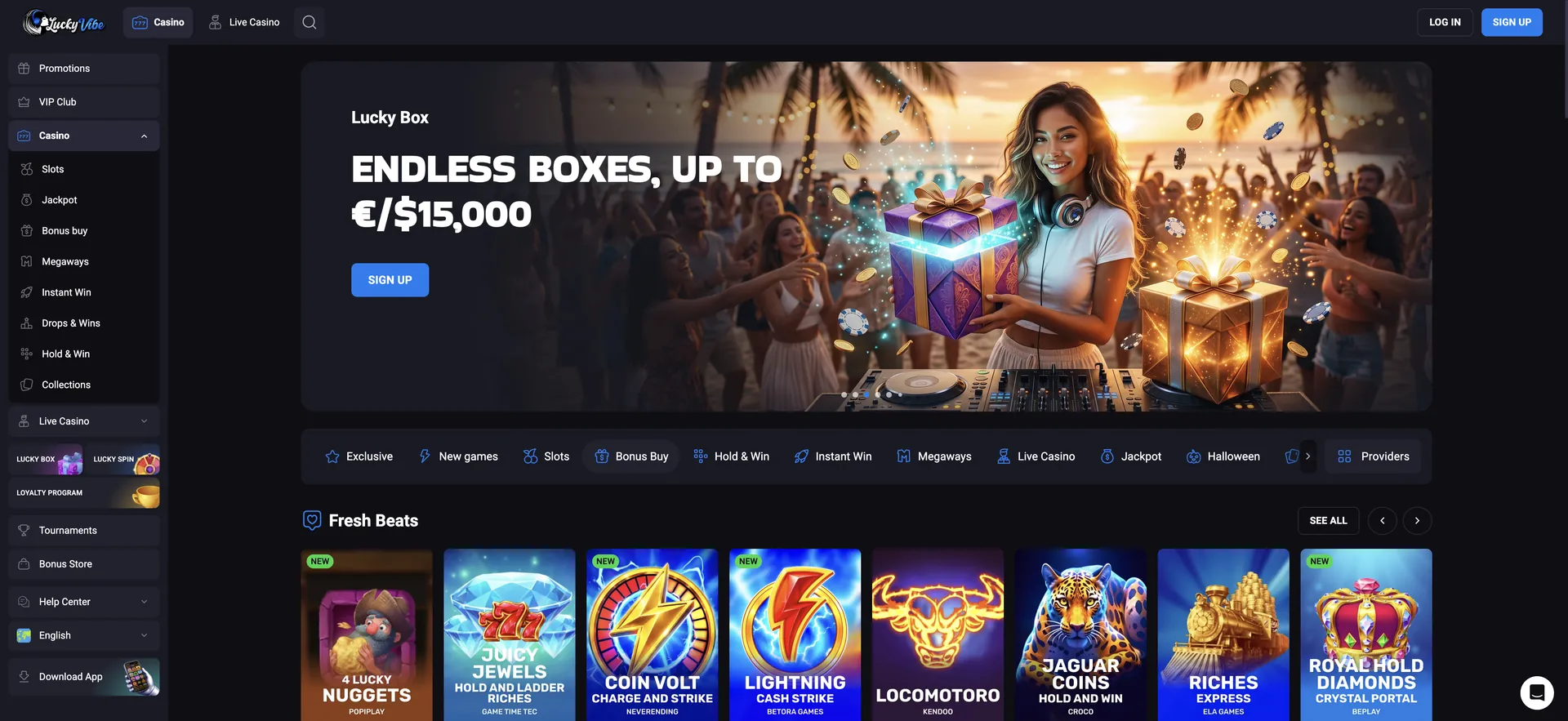
- Type the casino's address into the browser bar rather than following an ad or email link.
- Press LOG IN in the top-right corner, next to SIGN UP.
- Enter the email address used at registration.
- Enter the password; the eye icon reveals it to check for typos.
- Confirm the sign in and wait for the account balance to appear at the top of the page.
The sign-up window also links to login through "Have an account? Log in", for players who opened the wrong form. Once signed in, the cashier, bonus balance, Documents tab and responsible-gaming limits are all in the account menu.
02 Forgotten password
The casino FAQ says a new password can be obtained immediately through the forgot password page. The usual sequence:
- Press LOG IN and choose the forgotten password link in the login window.
- Enter the email address of the account.
- Open the reset email; check the spam folder if it does not arrive.
- Follow the link in the email.
- Set a new password that is not used on any other site.
- Sign in with the new password and check recent account activity.
A reset changes only the password. Limits, bonuses in progress and pending withdrawals stay as they were, and so does any KYC request already open on the account.
If the email address itself is no longer accessible, the live chat agents can help, but they may ask for ID to confirm ownership.
03 Secure access and troubleshooting
Most access problems have a clear cause. The account protections and the fixes below cover them.
Protect your account
The Terms forbid sharing an account with anyone, including family members, so the password should stay private. Use a unique password, sign out on shared devices, and do not log in through a VPN, which the Terms do not allow. Real casino pages sit on the luckyvibeaus.org domain, and the footer names Metlait SRL and licence ALSI-202509073-FI2; sites that copy the brand name on a different domain are not the casino and should not receive login details.
Phishing is the main risk around any casino login. Emails or messages that ask for a password, a one-time code or card details should be ignored; the casino does not need a password to help with an account. Bookmarking the real address after the first visit removes the need to search for it each time.
Common login problems
The table matches each symptom to its fix.
| Problem | Fix |
|---|---|
| Wrong password message | Check caps lock and the email address, then use the forgotten password link. |
| Reset email not received | Check spam, wait a few minutes, then ask live chat. |
| Logged out during play | A session limit may have been reached; it ends the session automatically. |
| Account disabled | Active self-exclusion or cooling-off; access returns only when the period ends. |
| Account locked after a withdrawal request | KYC not completed or the player unreachable for two weeks; upload documents and contact support. |
| Account suspended | Possible IP overlap with another account or a breach of the Terms; contact support. |
| Page or game does not load | Check the connection, clear the browser cache and cookies, restart the browser. |
FAQ
Short answers about Lucky Vibe login and account access.
Is the Lucky Vibe login the same on mobile?
Yes. The same email and password work in mobile browsers and through the site's Download App item; there is no separate mobile account.
How can the real site be recognised?
The address is luckyvibeaus.org and the footer names Metlait SRL with licence ALSI-202509073-FI2. Pages on other domains that only use the brand name are not the casino.
Why can a self-excluded player not log in?
Self-exclusion disables the account for the chosen period. A remaining balance can still be withdrawn by contacting support by email ([email protected]).